If an agency is going to run your Facebook and Instagram ads, the safest way to give them access is to add them as a partner in your Meta business portfolio. You stay the owner of everything. They only get the Pages, accounts and tasks you choose, and you can take that access away whenever you like.
This guide shows you how to do it in five steps, for any agency. If you are working with Staunton Rook, our business portfolio ID is 462749254165529. You will need it in step 4.
We checked every step against Meta’s own help pages and our own Business settings in November 2026. Meta changes its screens often, so if a button is named slightly differently, the step still applies.
What adding a partner means
A business portfolio is where your business keeps its Facebook Page, Instagram account, ad account and tracking in one place. Meta used to call it a Business Manager. Meta describes partners as other businesses, such as agencies, that you work with.
- You keep ownership. The assets stay in your business portfolio.
- They only do what you assign. Partners can only work on the tasks you give them.
- You can see it. You and your partner can both see the shared assets in Settings.
- You can remove them. It takes a minute, and we show you how below.
What you need before you start
- A Meta business portfolio. If you do not have one, jump to “No business portfolio yet?” below.
- Full control of that business portfolio. Meta says only people with full control can add partners.
- Your Facebook Page, Instagram account and ad account added to the business portfolio. Step 2 shows you where to check.
- Two-factor authentication turned on for your business portfolio, if Meta asks for it.
- Your partner’s business portfolio ID. For Staunton Rook, that is 462749254165529.
The five steps
- Open your business settings
- Check your Page and ad account are in your business portfolio
- Open Partners and choose Add
- Enter our business portfolio ID
- Choose what to share and confirm
Step 1: Open your business settings
Go to business.facebook.com and log in with the Facebook profile that has full control of your business portfolio. Select the cog (Settings) at the bottom of the left menu.
Check the business portfolio name at the top of the page. If you belong to more than one, make sure it is the right one. Under Business info you will also see your own business portfolio ID. You do not need it for these steps, but you will want it if you ask us to send the request instead (see below).
Step 2: Check your Page and ad account are in your business portfolio
In the left menu, under Accounts, open Pages, Instagram accounts and Ad accounts. Your Facebook Page, Instagram account and ad account should be listed. You can only share what is in the business portfolio.
If your ad account is missing, open Ad accounts, select Add, then Add an existing ad account. Meta explains that this moves the account into the business portfolio and that you need access to the ad account to add it. If you do not have an ad account yet, the same menu lets you create a new one.
Two things to know first. Meta warns that ad accounts cannot be removed from a business portfolio once they have been added, so only add accounts that belong to your business. And a business asset can only belong to one business portfolio, so if your Page or ad account already sits in someone else’s, ask them to share it or move it.
Step 3: Open Partners and choose Add
In the left menu, under Users, select Partners. Then select Add and choose Give a partner access to your assets. Meta describes it as the best option for allowing partners, like agencies, to manage your business assets.
If you cannot see Partners, you do not have full control of the business portfolio. Ask the person who set it up to give you full control, or to follow these steps themselves.
Step 4: Enter our business portfolio ID
A window called Add a new partner opens and asks you to enter the partner business ID. Type or paste ours, 462749254165529, then select Next. It is a business portfolio ID, not a Page number or an ad account number.
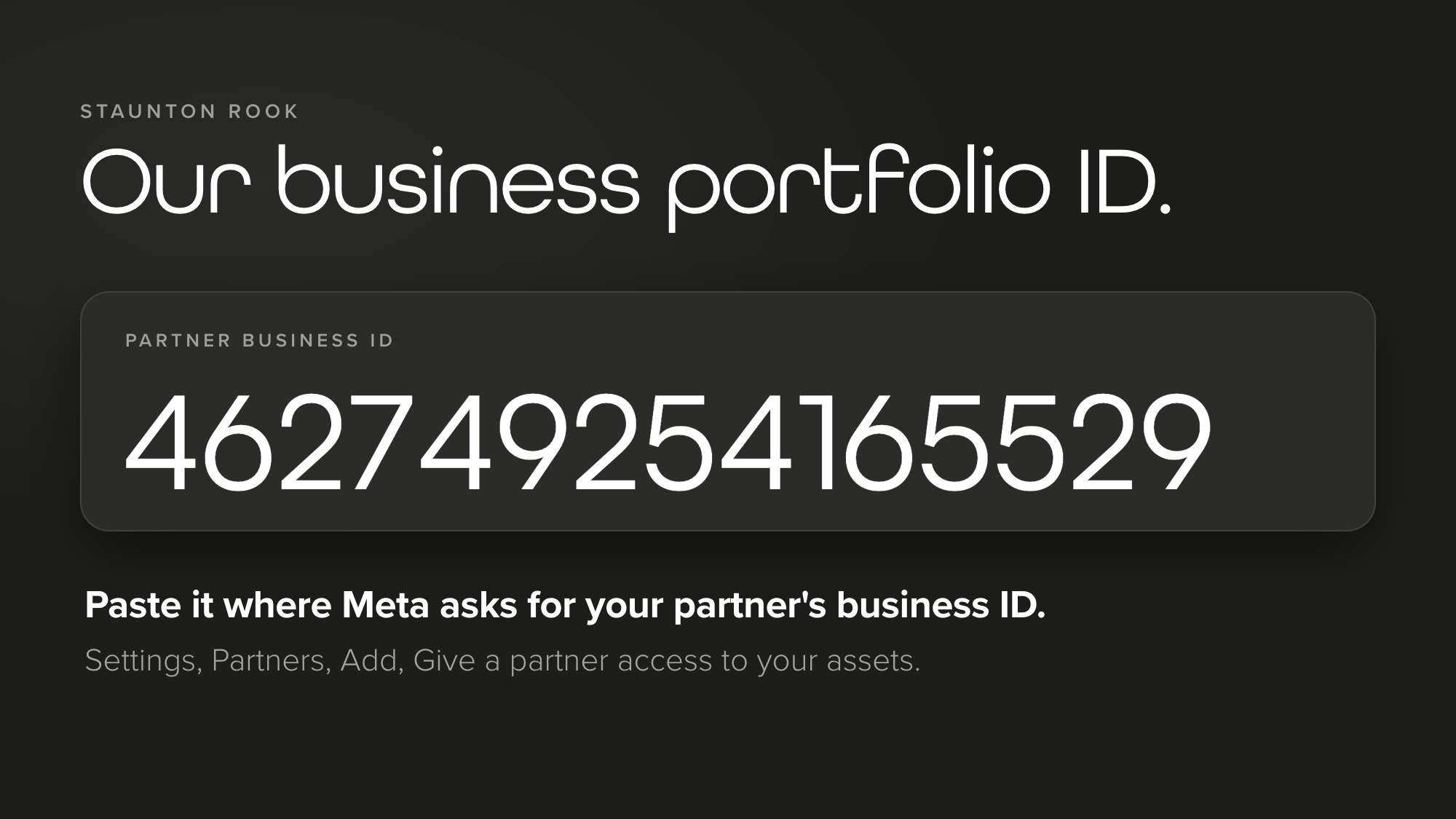
If you are adding a different agency, ask them for their business portfolio ID. Meta explains where to find it.
Step 5: Choose what to share and confirm
Now you choose what the partner can work on. Pick an asset type on the left, tick the assets you want to share, then set the access for each one. When you have finished, select Assign assets and check the review screen, including the partner’s name, before you confirm. Meta says that someone else with full control of your business portfolio may need to approve the action.
For every asset you can give full control or partial access. With full control, Meta says the partner can manage everything but cannot share your asset with another business. With partial access, you choose the specific tasks.
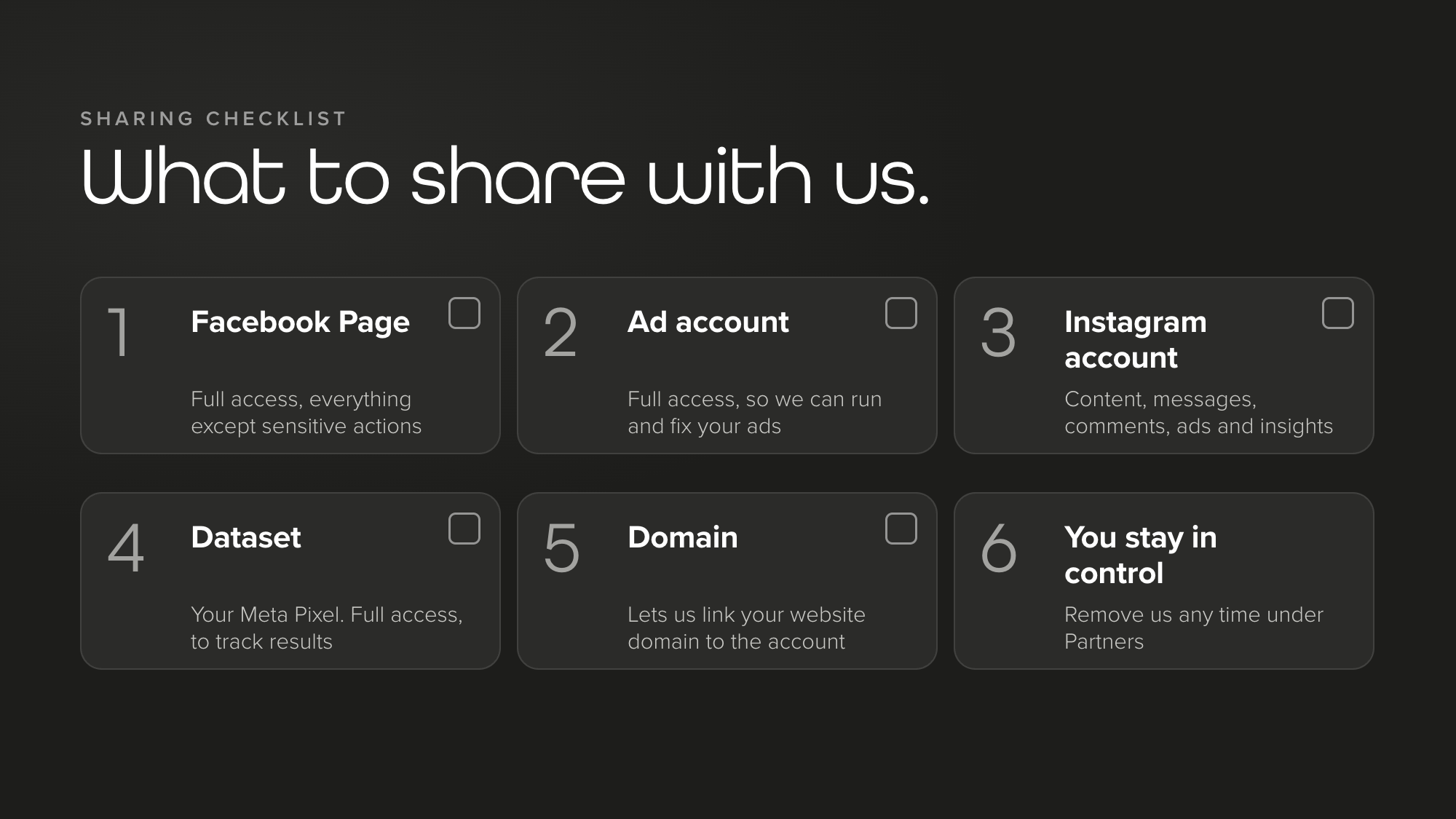
This is what we normally ask clients to share:
| Asset | What we ask for, and what it lets us do |
|---|---|
| Facebook Page | Full access. Meta words this as everything except sensitive actions. We can manage the Page and run ads from it, including who else has access to it. |
| Ad account | Full access. Create and edit ads, see reports, and manage the account’s settings, finances and permissions. |
| Instagram account | Content, messages, community activity, ads, insights, creator content and creator management. Post, answer messages and comments, run ads and see how the account performs. |
| Dataset (your Meta Pixel) | Full access. Set up and manage the tracking that shows which ads lead to enquiries and sales. |
| Domain | Link to domain. Connect your website domain to the business portfolio so your ads and tracking work properly. |
Prefer to share less?
You decide. For the ad account, Meta offers partial access options: Manage campaigns lets a partner create and edit ads, access reports and view ads, and View performance lets them access reports and view ads. The full access option, Manage ad accounts, also controls the account’s settings, finances and permissions. If you would rather keep that to yourself, choose partial access and tell us what you picked, so we can say whether it affects anything we have agreed to do.
When you have done it
Let us know, by email at hello@stauntonrook.co.uk or on 01244 323 250. We will check that we can see your Page, Instagram account, ad account and dataset, and tell you if anything is missing.
Prefer us to send the request?
You can also do this the other way round. We send a request from our side and you approve it. We need three things from you: the business portfolio ID of the business that owns your assets (Settings, then Business info), the name of your business, and the email address of the person who has full control.
We then use Add and Request access to assets as a partner or agency. Meta explains that you can approve or deny the request, or change which asset types and permissions are shared. Either way, you stay in charge of what we can see.
No business portfolio yet?
If your business does not have one, you can make one in a few minutes. Meta’s own steps are:
- Go to business.facebook.com and log in with your Facebook profile.
- Select the drop down menu below Home, at the top left, then Create a business portfolio.
- Enter a name that matches the public name of your business. Meta does not allow special characters in it.
- If you are using your Facebook profile, enter your first and last name and your business email, then select Create. Meta sends an email asking you to confirm the address.
You get full control of the new business portfolio. Meta says you can personally create up to 2, and there is no limit on how many you can belong to. Then add your Page, Instagram account and ad account (step 2) and carry on from step 3.
How to see, change or remove our access
Open Settings, select Partners and choose the partner. You will see every asset you have shared with them. Select Assign assets to change what they can do.
To remove a partner, select Options (the three dots) at the top right, choose Remove from business portfolio, then select Remove partner. You need full control to do it, and Meta’s page on removing partners has the same steps.
If something does not work
- I cannot see Partners. You do not have full control of the business portfolio.
- My ad account or Page is not in the list. It is not in this business portfolio yet. Go back to step 2.
- It says someone else needs to approve. Meta says another person with full control may need to approve the action.
- Meta asks about two-factor authentication. Meta asks you to turn it on for your business portfolio if it is not already on.
- The ID will not go in. Check you have copied all 15 digits, and that it is a business portfolio ID, not a Page or ad account number.
Still stuck? Email hello@stauntonrook.co.uk or call 01244 323 250 and we will talk you through it.
Meta partner access: questions, answered
What is a Meta business portfolio ID?
It is the unique number that identifies your business portfolio. Meta says you may need it to give a partner access to business assets and information. You can find it in Settings, under Business info, just below the name of your business portfolio.
Does adding a partner give them ownership of my Page or ad account?
No. Meta says the assets stay in your business portfolio and partners can only work on the tasks you assign to them. Even with full control, a partner cannot share your asset with another business. Only the business that owns it can do that.
Can I remove a partner later?
Yes. Open Settings, select Partners, choose the partner, select Options, then Remove from business portfolio and Remove partner. You need full control of your business portfolio to do it.
Why can I not see Partners in my settings?
Meta says you can only add partners if you have full control of the business portfolio, so if Partners is missing you probably do not have it. Ask the person who set up the business portfolio to give you full control, or to follow these steps themselves.
Do I have to give full access?
No. Meta lets you give a partner full control of an asset or partial access, where you choose the tasks, such as creating content, managing ads or answering messages. Tell your agency what you choose so they can say whether it affects the work you have asked for.
What is the difference between a partner and a person?
A partner is another business, such as an agency, that you add using its business portfolio ID. A person is someone in your own organisation. Removing one is not the same as removing the other.
The takeaway
Adding a partner takes about five minutes. You open Partners, enter the agency’s business portfolio ID and choose what to share. The Page, the ad account and everything in them stay yours, and you can see and change the access at any time.
If you are thinking about paid social, our social media team and our paid advertising team can show you what it could do for your business, and you can get in touch to talk it through. Setting up on Google too? Our guide to setting up a Google Business Profile is a good next read, and there are more in our guides.
Sources
- Meta Business Help Center: Add partners to your business portfolio
- Meta Business Help Center: Give a partner access to business assets in your business portfolio
- Meta Business Help Center: Ask a partner to share assets with your business
- Meta Business Help Center: Find your business portfolio ID
- Meta Business Help Center: How to create a business portfolio in Meta Business Suite
- Meta Business Help Center: Remove partners from your business portfolio
- Meta Business Help Center: About partners in Meta Business Suite
Staunton Rook is a full-service marketing agency based in Chester, working with hospitality businesses, professional services firms and consumer brands across the UK.